Sally asks.Your guys answer.Your office gets everything it needs.

Sally is an AI agent with one job: getting accurate data out of the field. Your guys just text or call her. No apps required.

  • Timesheets
  • Production
  • Safety
  • Site photos
  • Scheduling

Built for utility subcontractors

4:42

RecordLens Sally

Timesheet for Elmwood?
same crew as yesterday. same hours

finished trenching 220 ft
Got it — you, Mike, John, Cody, and Dustin. 9 hours each.

I logged 220 ft of trenching under 31.23.33 — Trenching & Backfilling.

Submit?
yes

Read 4:42 PM

Timesheet submitted.
Text Message • RCS

Just call or text Sally. No app required.

Timesheets, JSAs, safety observations, to-do lists — anything the field used to write down. No switching between apps and screens. Your crews call or text Sally, and she does the rest.

A construction worker calling RecordLens Sally from a work truck.

Timesheets via phone call

Your foreman finishes the whole timesheet on the drive home — no app to open hours or days later. Sally already knows the job, the crew, and the cost codes.

Call transcript

Jack Wilson

I want to do my timesheet now.

Sally

Great. Is that for Broadway Substation?

Jack Wilson

Yeah. Me, John, Mike, Cody, and Dustin. Me and John were on line work, Mike ran the digging machine, and Cody and Dustin handled ground support. 6 AM–4 PM, with a 30-minute lunch.

Sally

Logged and submitted — 5 workers, 47.5 paid hours, split across your usual classifications. Call or text me if anything changes.

Call ended

Broadway Substation

Crew timesheet

Date
Aug 7, 2026
Crew
5 workers
Paid hours
47.5 total
Source
Voice call
Worker or activityHours

Jack Wilson

Lineman6 hours
Groundman3.5 hours

John Miller

Lineman6 hours
Groundman3.5 hours

Mike Rader

Digging Machine Operator6 hours
Groundman3.5 hours

Cody Whitaker

Groundman6 hours
Laborer H&H - Group B3.5 hours

Dustin Hale

Groundman6 hours
Laborer H&H - Group B3.5 hours
5 workers47.5 hours
A utility worker sending JSA photos to RecordLens Sally from the field.

Safety compliance via text message

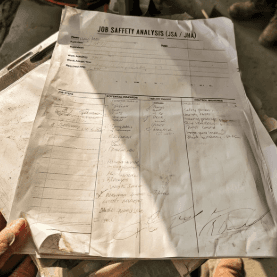
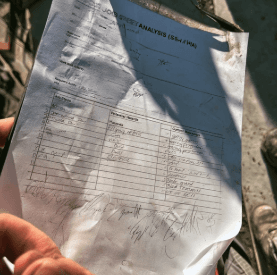
Your crews can keep the paper JSAs they already know. They text Sally a photo. She reads it, asks about unclear details, and files it to the right project. Nobody types it again at the office.

Text message

8:14

RecordLens Sally

Your JSA photos are due by 9 AM.
Photo of a completed job safety analysis form.Second photo of the completed job safety analysis form.

Read 8:14 AM

Looks good. On line 6, is that Jack Smith or Jack Smythe?
Jack Smith.

Read 8:14 AM

Got it — JSA submitted.
Text Message • RCS

Job safety analysis

Broadway Substation · Jul 27–Aug 7

Daily JSA compliance

DateStatusEvidence

Aug 7

Complete

2 photos

Aug 6

Complete

1 file

Aug 5

Missing

No JSA

Aug 4

Complete

1 file

Aug 3

Complete

1 file

Jul 31

Late

1 file

Jul 30

Complete

1 file

Jul 29

Complete

1 file

Jul 28

Missing

No JSA

Jul 27

Complete

1 file

A project scheduler reviewing the Broadway Substation crew plan.

Schedule changes via web chat

The field never touches a screen — but you can. Tell Sally about a schedule change from your desk, in plain English. She applies it to the right project, dates, and crew, and confirms when it's done. No forms, no dropdowns.

Web chat

Chat with Sally

RecordLens web chat

Add Mark Robinson to the crew on Broadway Substation for next week, Monday through Friday.
Done. Mark Robinson was added to the Broadway Substation crew for Monday through Friday next week.

Project schedule

RecordLens/Broadway Substation

Aug 5 – Aug 19, 2026 · Valparaiso, IN

W5
Th6
F7
S8
Su9
T11
W12
Th13
F14
S15
Su16
M17
T18
W19
Elena Park
Mark Robinson
Luis Ortega
Devon Brooks
Bucket Truck
Structure setting
Site cleanup

Want this for your crews?

Book a demo

Everything else Sally captures

Crew & labor
People, hours, breaks, and labor classifications.
Equipment
Machine hours, locations, moves, and downtime.
Materials
Deliveries, usage, tickets, and quantities.
Production
Installed quantities, completed work, and cost codes.
Photos & documents
Paper timesheets, tickets, receipts, and photo proof.
Safety
JSAs, inspections, incidents, good catches, and corrective actions.

What the office gets

Sally is how it gets in — the record is what you keep. Everything she captures lands in RecordLens: review it, export it to Excel, create payroll-ready files, or send it straight to your payroll system. Nobody at the office types it all in again.

Project warboard
See crews, equipment, milestones, and upcoming work across active projects.
Excel exports
Download clean labor, equipment, material, and production data.
Payroll uploads
Confirmed people, hours, breaks, and classifications — formatted for import into ADP, Foundation, Viewpoint, or whatever runs your payroll.
Payroll & HR system sync
Move confirmed employee and labor data into the system you already run.
Reporting & job costing
Use complete project records for reporting, cost codes, and plan vs. actual.

One warboard for all of your projects

Every project schedule rolls up into one clean, current view. Know where crews are committed, what's active, and what comes next.

RecordLens/Company warboard
All divisions

Active projects

7 projects · 3 divisions · Crew coverage by day

Aug 3–16, 2026

Project

Mon

3

Tue

4

Wed

5

Thu

6

Fri

7

Sat

8

Sun

9

Mon

10

Tue

11

Wed

12

Thu

13

Fri

14

Sat

15

Sun

16

Broadway Substation

Utility

Valparaiso, IN · Started Jul 27

Elmwood Feeder Upgrade

Utility

Elmwood Park, IL · Started Aug 3

Cedar Junction Fiber

Utility

Cedar Lake, IN · Starts Aug 12

River Road Drainage

Civil

Hammond, IN · Started Aug 6

North Plant Expansion

Industrial

Portage, IN · Started Aug 7

Lakeside Pump Station

Civil

Gary, IN · Starts Aug 10

Crane Bay Retrofit

Industrial

Burns Harbor, IN · Starts Aug 11

Swipe to see the full two weeks →

In management?Just tell Sally what you need from the field & she gets it for you.

Configuring Sally works the same way for leadership — you just text her. Reminders, dispatch texts, and recurring rules: tell her once, and she follows up and sends you the report.

Step 01

You set the rule

Text Sally once. Plain English.

8:14
S

RecordLens Sally

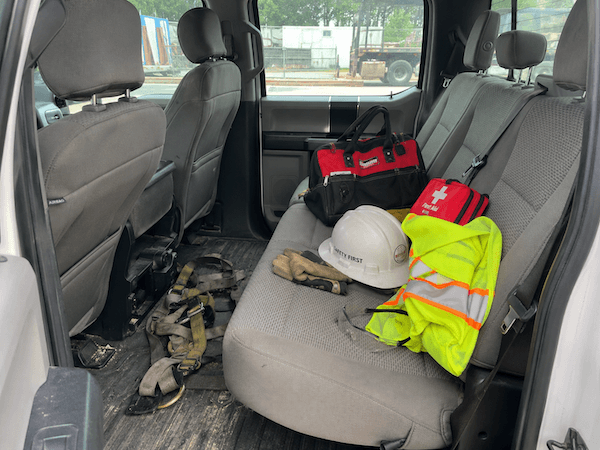
Foremen need to check their safety equipment every 3 months. Make them take a photo for proof.

Read 8:14 AM

Got it. I'll send a text to all 6 foremen this morning to request a photo of their safety equipment.
You'll see the status update in your email tonight.
Text Message • RCS

Step 02

Sally follows up

The same SMS goes to every foreman. She collects the proof.

11:23
S

RecordLens Sally

Hi John — your quarterly safety equipment check is due. Send a photo of your gear today.
Safety equipment photo sent by a foreman.

Read 11:23 AM

Great, that's all I needed.
Text Message • RCS
×6 foremen

Step 03

You get the report

One email with who did it, who didn't, and the photos.

6:00
1 Message
S

RecordLens Sally

6:00 PM

To: Business Owner

Quarterly Safety Equipment Check

Status as of 6:00 PM

  • Missing

    Marcus Boyd

    no response

  • Out

    Travis Beasley

    vacation

  • In

    John Miller

    [photo]

  • In

    Pete Kowalski

    [photo]

  • In

    Ryan Schmitt

    [photo]

  • In

    Denny Fulton

    [photo]

4 of 6 in — 1 missing, 1 out.

Rules Sally can run

Each one takes one text to set up. Sally runs it until you tell her to stop.

  • I want every foreman to submit a daily report by 5pm.
  • Text me if any crew hasn't submitted a timesheet by 6pm.
  • Send dispatch texts to the crew at 5pm every weekday.
  • Make sure someone sends the site-specific safety plan the night before a job starts.

Questions owners ask

Will my crews actually use it?
They already know how to make a phone call. Nothing to install, nothing to learn — any phone, any carrier.
Do my guys need to download anything?
No. Nothing. Crews call or text Sally the way they'd call or text anyone else.
Can I trust the data before it hits payroll?
Sally confirms names, hours, and cost codes instead of guessing, and your office reviews everything in RecordLens before it goes anywhere.

See Sally in action

Book 20 minutes. We'll show you how one ordinary crew conversation becomes clean, usable office data.

Book a demo
SOC 2 Type 2SOC 2 Type 2 compliant. Read the security brief.